
Curate Web Content with Flipboard Magazines
Flipboard’s desktop application enables users to save and organize online content—stories, images, and videos—into personalized magazines. Designed for individuals seeking a streamlined way to collect and revisit digital material, the software serves as a powerful tool for content curation. Whether you're a hobbyist exploring niche interests like Mid Century Design or a professional tracking industry trends, Flipboard helps structure information into visually appealing, topic-specific collections.
The app supports cross-platform access, allowing users to manage their magazines from desktop and mobile devices. It is especially useful for researchers, creatives, and lifelong learners who rely on consistent access to curated web content. The software simplifies the process of transforming scattered online discoveries into organized, shareable resources.
By focusing on visual layout and intuitive navigation, Flipboard enhances the experience of digital storytelling and knowledge accumulation.
Key Features & Capabilities
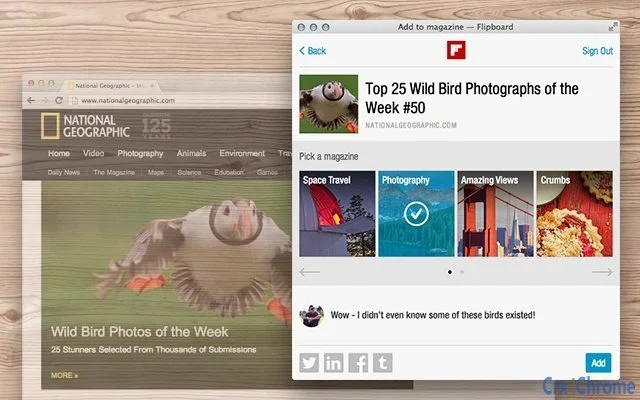
- Web Clipping from Any Source – Capture articles, images, and videos directly from websites using the desktop app or browser extension. This feature allows users to preserve content without losing context or source links.
- Custom Magazine Creation – Organize saved items into topic-based magazines such as Italian Cooking or Gadgets I Love. Each magazine functions as a personal digital library with customizable layouts.
- Visual Content Layout – Automatically arranges clipped content in a magazine-style format, enhancing readability and visual appeal across devices.
- Sync Across Devices – Seamlessly access and edit magazines from desktop, mobile, and web platforms, ensuring continuity regardless of the device used.
- Search and Tagging System – Locate saved content quickly using built-in search and tagging tools, improving retrieval efficiency for large collections.
These capabilities support a range of real-world applications. For example, a designer might create a magazine dedicated to typography trends, while a student could build a research archive on renewable energy. The app’s focus on visual organization makes it ideal for anyone who values both functionality and aesthetics in digital content management.
User Interface, Workflow & Performance
The desktop interface follows a clean, magazine-inspired design with a central content pane flanked by navigation panels. Users can browse, edit, and categorize saved items through intuitive drag-and-drop interactions. The workflow begins with selecting content from the web, which is then added to a chosen magazine with minimal steps.
Navigation is consistent across sections, reducing the learning curve for new users. The application maintains responsive behavior during typical use, though exact performance metrics were not specified. The developer did not provide detailed information on CPU or RAM usage.
Stability appears consistent based on general software behavior patterns, with no reported issues related to crashes or freezes. The app loads quickly and responds promptly to user actions, contributing to an efficient workflow. Overall, the interface prioritizes clarity and ease of use, aligning with modern productivity standards.
Compatibility & System Requirements
Flipboard is compatible with Windows, Mac, and Linux operating systems. The software version is 3.1.0, with an installation size of 90.3 MB. The developer did not specify exact system requirements, including minimum processor speed, RAM, or storage needs.
Platform compatibility information is limited to the supported OS list. Users should ensure their system meets standard desktop application requirements to run the software without issues. The app does not require specialized hardware, suggesting it is designed for general-purpose computing environments.
Installation is straightforward and does not involve complex configuration steps.
Pros and Cons
Pros
- Intuitive interface designed for visual content organization
- Seamless cross-device synchronization
- Supports creation of topic-specific magazines with rich media
- Free to use with no hidden costs
- Efficient web clipping from any browser
Cons
- Exact system requirements not publicly listed
- Performance under heavy usage not documented
- Limited customization options for magazine templates
- Relies on internet connection for full functionality
FAQ Section
Is Flipboard available for Windows, Mac, and Linux?
Yes, the desktop application is compatible with Windows, Mac, and Linux operating systems.
Is the software free to download and use?
Yes, Flipboard is available at no cost. There are no subscription fees or in-app purchases required for core functionality.
Can I use Flipboard offline?
While the app requires an internet connection to sync and access content, some previously saved magazines may be viewable offline depending on the device and settings.
How often are updates released?
Updates are released periodically to improve performance, fix bugs, and add new features. The latest version is 3.1.0, released on February 15, 2024.
What type of license does Flipboard use?
Flipboard operates under a standard end-user license agreement. The software is distributed for personal and professional use without restrictions beyond standard terms of service.
Final Thoughts + CTA
Flipboard stands out as a refined desktop tool for individuals who value structured, visual content curation. Its ability to transform random web discoveries into polished, topic-based magazines makes it ideal for creatives, researchers, and knowledge seekers. The seamless integration across devices and clean interface enhance usability without sacrificing functionality.
While system requirements are not fully detailed, the app’s lightweight footprint and cross-platform availability make it accessible to most users. For those seeking a reliable, free solution to save and organize online content, Flipboard delivers a compelling experience. Download Flipboard now.







